Four phone chargers, a monitor lead, a laptop brick and a leftover extension cord tangled together under a desk is the exact mess a cable management tray is built to solve: a bracket-mounted channel, basket or box that clips or clamps beneath the desktop and holds the power board plus every cord running to it, off the floor and out of sight. The best cable management tray Australia buyers can actually get delivered ranges from a screw-mounted plastic channel that runs the width of a standing desk to a compact steel basket that clamps on in under a minute with no drill required.
Australia’s market splits into three real shapes: **under-desk trays** (a rigid plastic or aluminium channel that screws or clamps flush beneath the desktop and can run almost its full width), **clamp-on wire baskets** (a compact steel mesh box that grips the desk edge with a thumbscrew, no drilling involved), and **cable boxes** (a smaller foam or plastic case that sits on the floor or desktop and swallows one power board plus its chargers). Most of what turns up in a search is one of the first two; the third shape suits a desk where drilling or clamping is not an option at all.
Length is the spec that actually decides which shape suits a given desk: a clamp-on basket is sized around a single power board and typically runs 30 to 45cm – well, closer to 40cm for most of the baskets checked for this guide – while a full under-desk tray needs to span most of a 120-160cm desktop to look intentional rather than half-finished. The spec most buyers skip past entirely is ventilation – an enclosed plastic channel looks tidier but holds heat in around whatever power board sits inside it, while an open mesh basket lets that same heat escape straight through the sides. Sounds trivial until four chargers are drawing current at once on a hot afternoon with the study door shut.
Ten picks make this list, running from a single clamp-on basket sized for one power board through to a near desk-width tray built for a dual-monitor standing desk setup, covering both the enclosed and the open-mesh shape side by side.
Quick Picks

ErgoDesk Under Desk Cable Management Tray
A full 100cm plastic channel that screws flush under a standing desk and swallows a power board plus every lead running to it.
CHECK CURRENT PRICE
Mesh Under Desk Cable Organiser
A steel mesh basket that clamps straight onto the desk edge in under a minute, no drill, and lets heat from a power board escape instead of building up.
CHECK CURRENT PRICEBest Cable Management Tray Australia Compared
| Product | Link | Type | Best For | Key Spec |
|---|---|---|---|---|
| Lifespan Fitness ErgoDesk Under Desk Cable Management Tray | Check price | Screw-mount tray | Standing desks 120cm+ | 100 x 18 x 12cm, 3kg, 4-screw mount, both ends open |
| Mesh Under Desk Cable Organiser with Clamp | Check price | Clamp-on mesh basket | Renters, no-drill setups | Steel mesh, clamp fits ~1-5cm desktop, ties + 2 grommets + wrench included |
| D-Line Cable Management Box | Check price | Enclosed floor/shelf box | TV consoles, printer stands, no under-desk mount | ABS plastic, vented lid, no mounting hardware, holds ~1 power board |
| Brateck Under-Desk Cable Management Tray | Check price | Screw-mount steel tray | Single-monitor desks, small parts that would fall through mesh | 600 x 135 x 108mm, powder-coated steel, 2-bracket screw mount |
| Extended Length Under Desk Cable Tray | Check price | Telescoping clamp-on basket | Not yet sure of the exact desk width | Telescoping mesh sections, clamp mount, adjustable length |
| VIVO Under Desk Cable Management Tray | Check price | Screw-mount steel shelf | Compact desks, corner units | 17in steel U-channel, 2-bracket screw mount, open front |
| Adjustable-Length Slotted Cable Tray | Check price | Adjustable-length clamp tray | Desks with an off-centre leg or drawer unit | Slotted steel rail, bolt-adjustable length, clamp mount, tools included |
| Metal Mesh Cable Tray with Clamp | Check price | Clamp-on mesh basket | Buyers who want the deepest review history | Steel mesh, clamp mount, cable ties included, holds 1 power board |
| Metal Mesh Cable Organiser with Clamp Mount | Check price | Clamp-on mesh basket | Highest average rating in the mesh-basket shape | Steel mesh, 2-hole clamp bracket, cable ties included |
| Ultra-Rugged Desktop Cable Rack | Check price | Clamp-on cable rack | Lowest price, single power board | 14.3in tray, clamp mount, front-lip cable clips, white finish |
How We Picked
We started with a broad sweep of Australian retailer catalogues and general marketplace listings, looking specifically for a real under-desk tray or clamp-on basket, not a desk with a cable hole cut into it. Cable management turned out to be a thin category for local retailer stock once duplicate listings of the same physical product were merged into one entry, so most of this lineup comes from the open marketplace, checked for real Australian availability, current stock and a dispatch window that does not stretch into weeks.
From there we cross-checked real-world experience wherever it existed: verified-buyer ratings and review counts, and the kind of recurring complaint pattern that only shows up once enough owners have actually mounted one under a real desk.
1. Lifespan Fitness ErgoDesk Under Desk Cable Management Tray – Best for Standing Desks
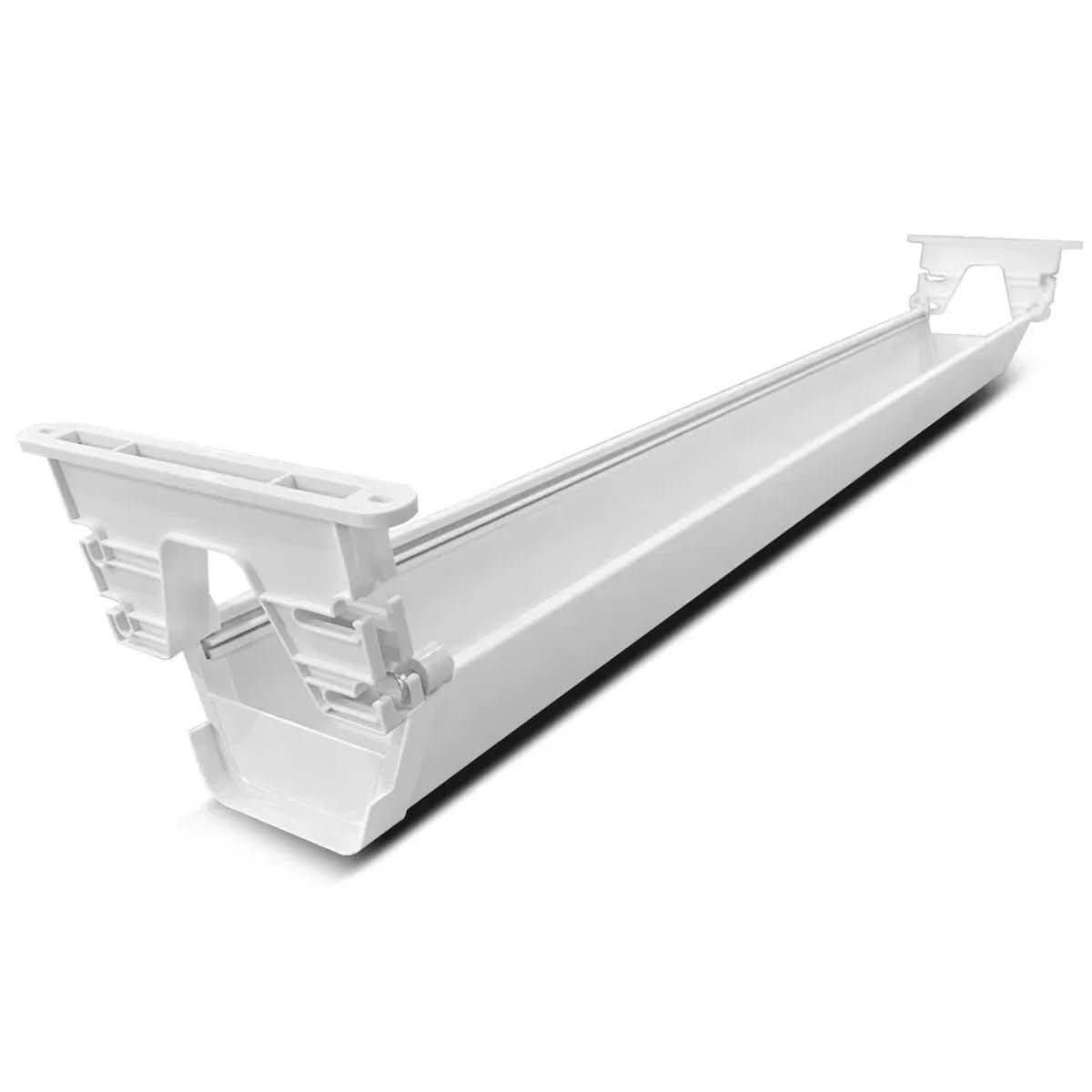
Lifespan Fitness already sells the WalkingPad treadmill desks that a lot of Australian home offices are quietly running under a standing desk, and this tray is the matching cable solution: a single 100 x 18 x 12cm moulded plastic channel that screws flush to the underside of almost any timber tabletop. Both ends stay open, so a lead can run in from the wall and back out to the monitor without threading it through a slot first.
At three kilograms empty it is heavier than it looks in photos, which is exactly why it needs four proper screws rather than adhesive pads. Mounted, it holds a full-size power board, two phone chargers and a laptop brick with room to spare, and an older weatherboard desk with a soft particleboard top is about the only case where those screws need a fibre plug first.
The trade-off is length: at a full metre it only makes sense under a desk at least 120cm wide, and a smaller desk ends up with the tray poking past both edges. Next to the mesh basket in the number two spot, which clamps on in under a minute, this is the slower, more permanent install – worth it only if the desk underneath is staying put. It also sits at the premium end of this guide, not the budget one, which is the right call when the standing desk above it is already a serious piece of furniture.
Pros
- Runs a full 100cm under a standing desk, longer than most on this list
- Both ends stay open for easy re-routing when a cable changes
- Four-screw mount holds real weight without sagging
Cons
- Needs a drill and four screws, not a clamp, so a rental with a strict end-of-lease clause is a harder sell
- At 100cm it is too long for most single-monitor desks under 120cm wide
Key specs: 100 x 18 x 12cm, 3kg, 4-screw mount, both ends open
CHECK CURRENT PRICE2. Mesh Under Desk Cable Organiser with Clamp – Best No-Drill Clamp-On
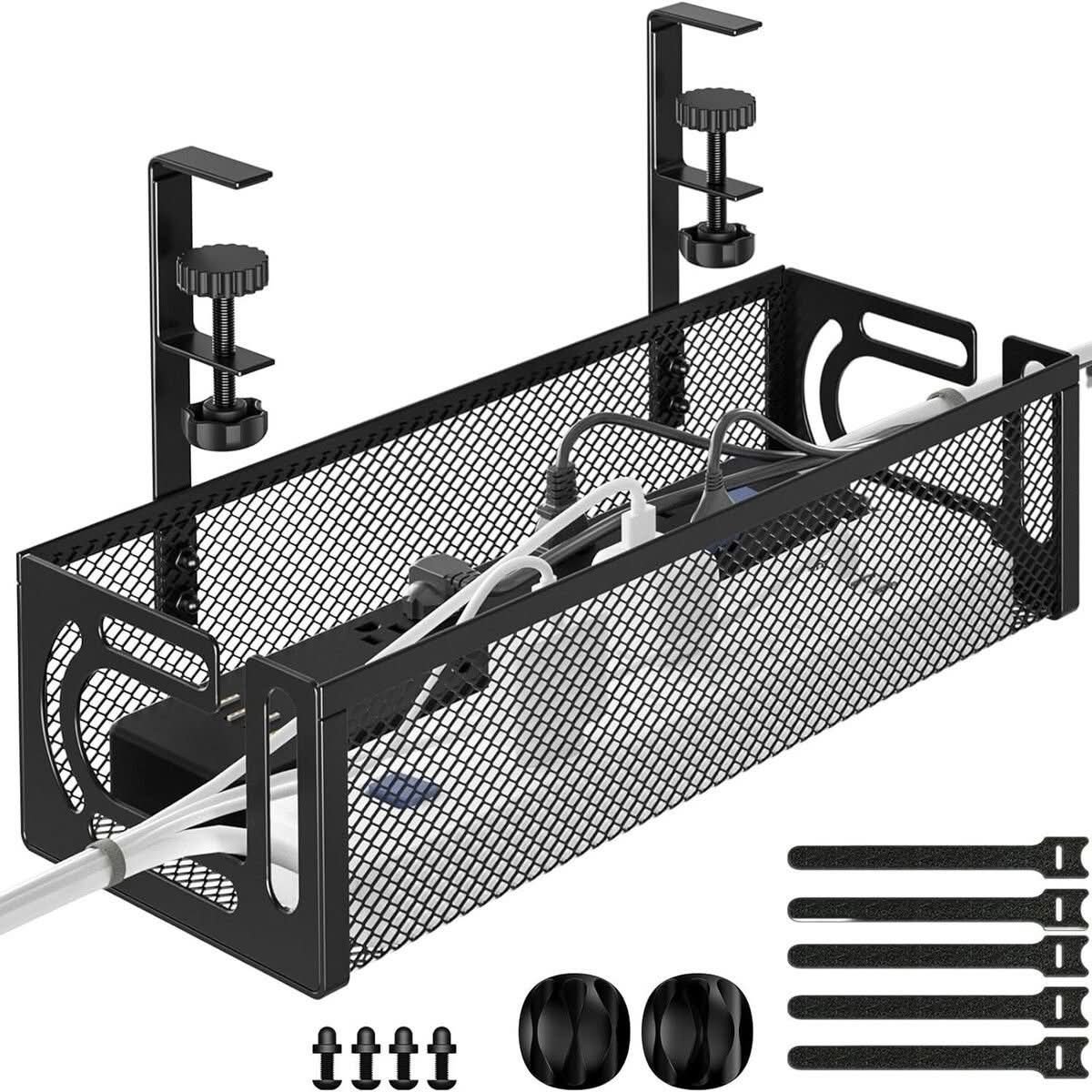
This one skips the drill entirely. Two thumbscrew clamps grip the desk edge across roughly 1 to 5cm of desktop thickness, and the steel mesh basket hangs underneath with no permanent fixing at all – back the clamps off and the desk looks exactly like it did before.
The mesh construction is the real point of difference against the solid plastic tray at position one: a power board buried inside an enclosed channel holds onto its own heat, while this design lets it dissipate straight through the sides. It is a small thing until four chargers are drawing current on a hot Brisbane afternoon with the office door shut, and an enclosed alternative runs noticeably warmer to the touch than the mesh one under the same load.
It is also the cheapest pick in this entire lineup, sitting well under half the price of the tray above it, which makes sense once the basket is in hand – a single power board fits with a little room either side, but a second board or a run of USB hubs pushes past what the mesh comfortably holds. The hardware kit (a wrench, cable ties and two cord grommets) is a nice inclusion at this price, though the grommets are a stiff rubbery fit that need a firm push to seat properly in the mesh.
Pros
- No drill, no permanent fixing – clamps straight onto the desk edge
- Open mesh lets heat from a power board escape instead of building up
- Cheapest pick in this entire lineup, with a hardware kit included
Cons
- Only really fits one power board – a second board or a cluster of USB hubs overflows it
- The included cord grommets need a firm push to seat properly in the mesh
Key specs: Steel mesh, clamp fits ~1-5cm desktop, ties + 2 grommets + wrench included
CHECK CURRENT PRICE3. D-Line Cable Management Box – Best Enclosed Cable Box
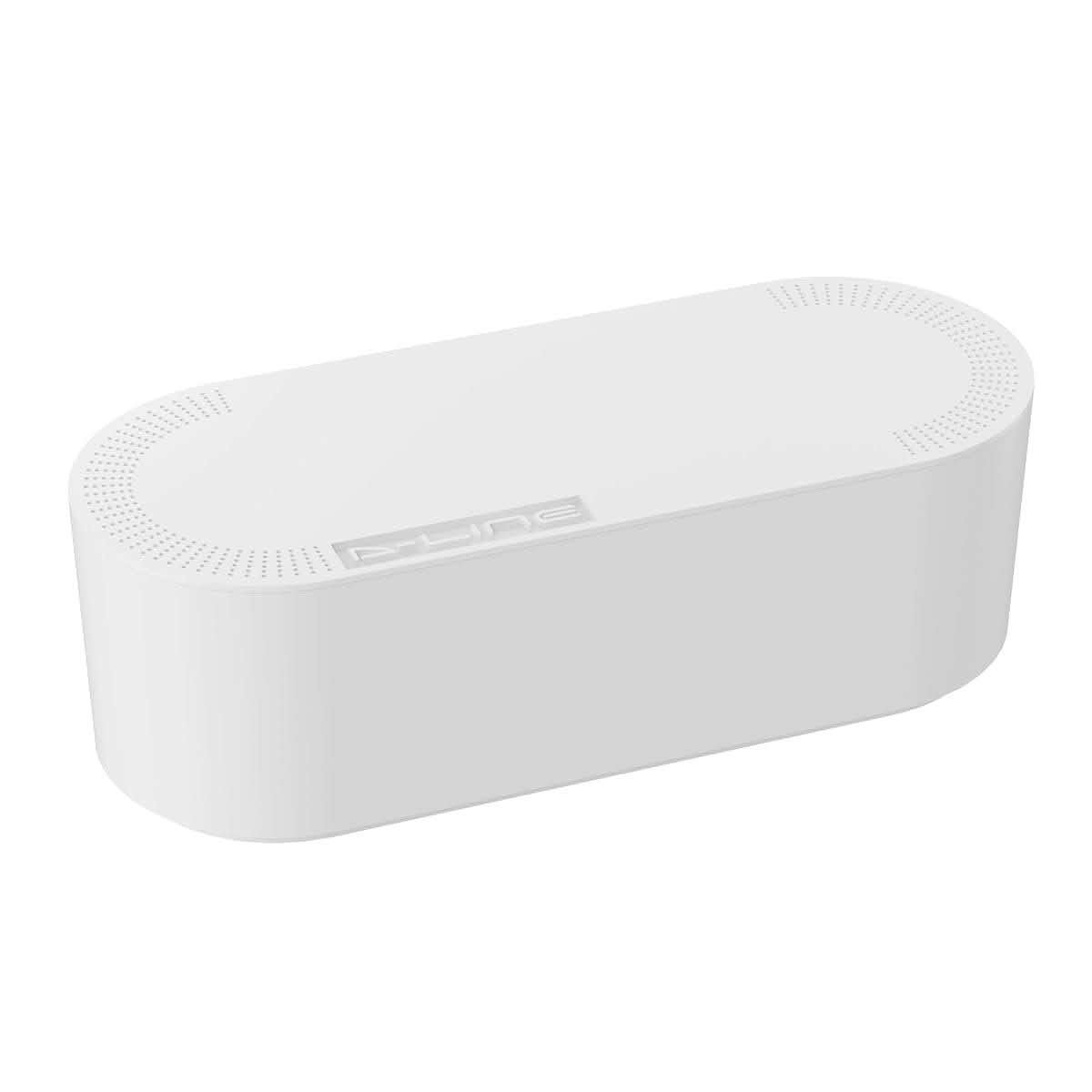
Not every power board sits under a desk. A TV console, a printer stand or a games console shelf often has the same tangle of cords with nowhere to clamp a tray to, and this is the one pick on this list built for exactly that: a fully enclosed ABS box that just sits on the floor or a shelf, no mounting hardware at all. The lid has a row of small vents along both long edges (each about the width of a pencil) instead of sealing solid, which matters given the ACCC’s own recall history on power boards that cannot shed heat.
At 4.5 stars it has the strongest rating of any pick in this enclosed shape, though the inside runs smaller than the outer dimensions suggest – a single power board with three or four chargers fills it, and a second board is a real squeeze. It also sits at the premium end of this guide alongside the ErgoDesk tray at position one, priced closer to a small appliance than a length of steel mesh.
Pros
- Fully enclosed, so it is the tidiest-looking pick on a shelf or floor, not just under a desk
- Vented lid avoids sealing a power board in completely
- No mounting hardware needed at all – it just sits in place
Cons
- The lid is a firm push-fit that can pop off if the box is nudged with a foot
- Interior room is tighter than the outer dimensions suggest once a power board and its plugs are inside
Key specs: ABS plastic, vented lid, no mounting hardware, holds ~1 power board
CHECK ON AMAZON4. Brateck Under-Desk Cable Management Tray – Best Heavy-Duty Steel Tray
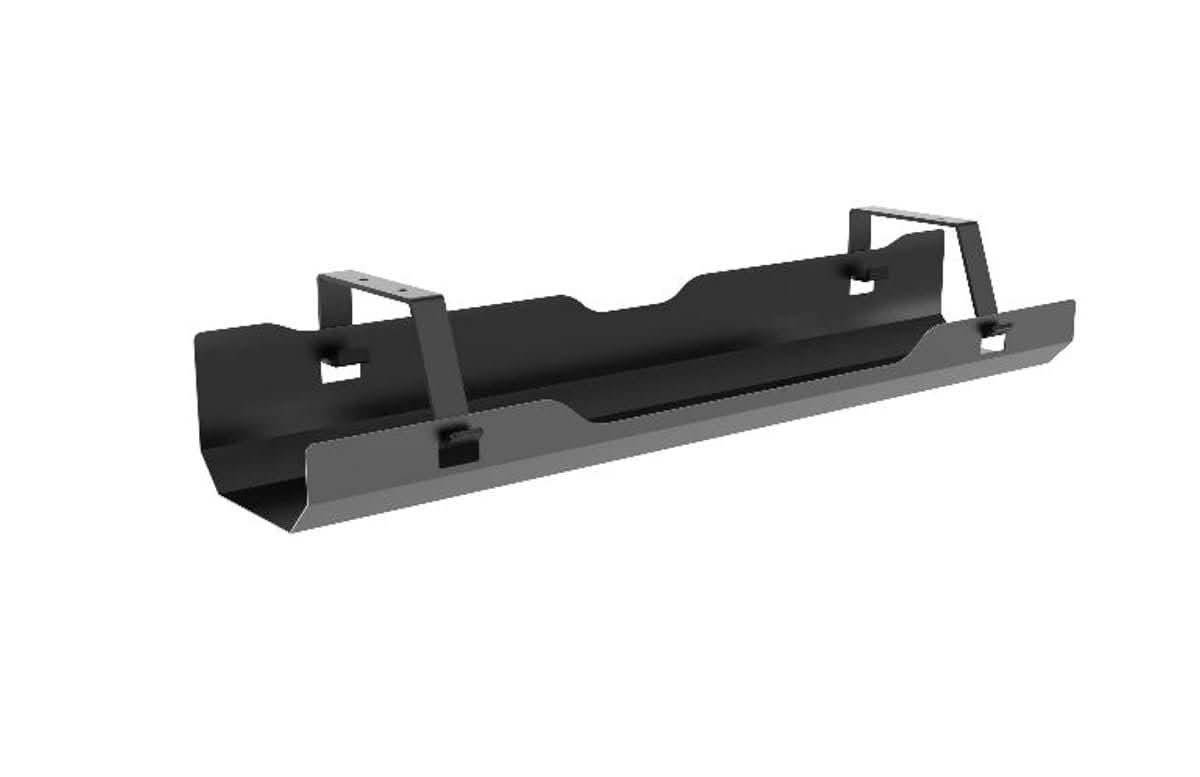
Brateck’s own bracket-mount tray is powder-coated steel rather than the moulded plastic of the ErgoDesk at position one, and at 600 x 135 x 108mm it is built more like a small steel drawer than a basket – solid sides, a flat floor, and two L-brackets that screw to the underside of the desk.
Against the mesh designs further along this list, the solid floor means nothing can slip through (no gaps for a dropped USB dongle to vanish through), which matters for small phone chargers and dongles that would fall straight out of an open basket. It carries a real 4.8-star rating off ten reviews, thin but consistently positive, and the steel construction shrugs off the kind of knee-bump that would eventually work a plastic tray loose.
It needs a drill same as the ErgoDesk tray, and at 60cm it is shorter, so it suits a single-monitor desk better than a dual-monitor spread. It sits in the mid-range for this category in Australia – not the cheapest, not the most expensive, and comparable to what you would pay at Officeworks for a similar bracket-mounted steel shelf.
Pros
- Solid steel floor – nothing slips through the way it can with an open mesh basket
- Powder-coated finish holds up to knocks better than moulded plastic
- A solid 4.8-star rating, even if the review count is still modest
Cons
- Only 10 reviews on the local listing, a thinner track record than the picks with hundreds
- Needs a drill and two brackets, the same install effort as the ErgoDesk tray at position one
Key specs: 600 x 135 x 108mm, powder-coated steel, 2-bracket screw mount
CHECK ON AMAZON5. Extended Length Under Desk Cable Tray – Best Extendable Length
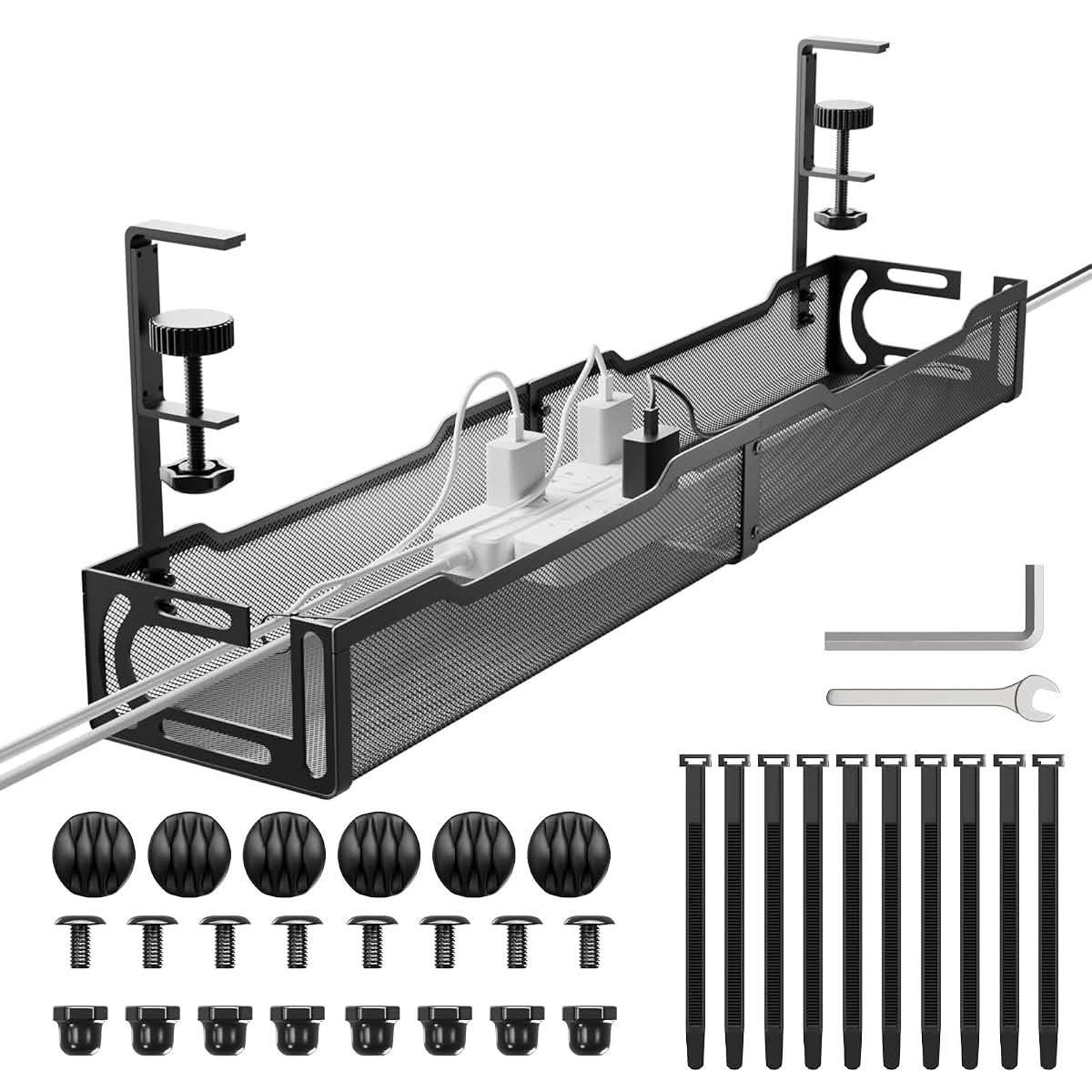
This is the only pick on the list built to change length after it is already mounted. Two mesh sections slide against each other and lock at whatever span the desk needs, roughly matching a mid-size desk at their shortest and stretching to cover a wider one without buying a second unit.
The clamp mount means no drilling, same as the mesh basket at position two, but the sliding sections are the actual point of difference – useful for anyone who isn’t sure yet whether the next desk will be 120cm or 160cm wide, or who is buying before the desk itself arrives.
At 4.3 stars off 42 ratings it sits in the middle of the pack for review depth. The sliding mechanism is the one part worth watching: it holds its set length under normal use, but pulling it in and out repeatedly to resize it is not something the clamp screws are built to survive indefinitely.
Pros
- Adjustable length is actually useful when the exact desk width is still unknown
- No-drill clamp mount, same as most of the mesh designs on this list
- Mid-range price for a feature none of the fixed-length trays offer
Cons
- The telescoping joint is not built for repeated resizing – set it once and leave it
- 42 ratings is a decent sample, but nowhere near the deepest review history on this list
Key specs: Telescoping mesh sections, clamp mount, adjustable length
CHECK ON AMAZON6. VIVO Under Desk Cable Management Tray – Best Compact Basket
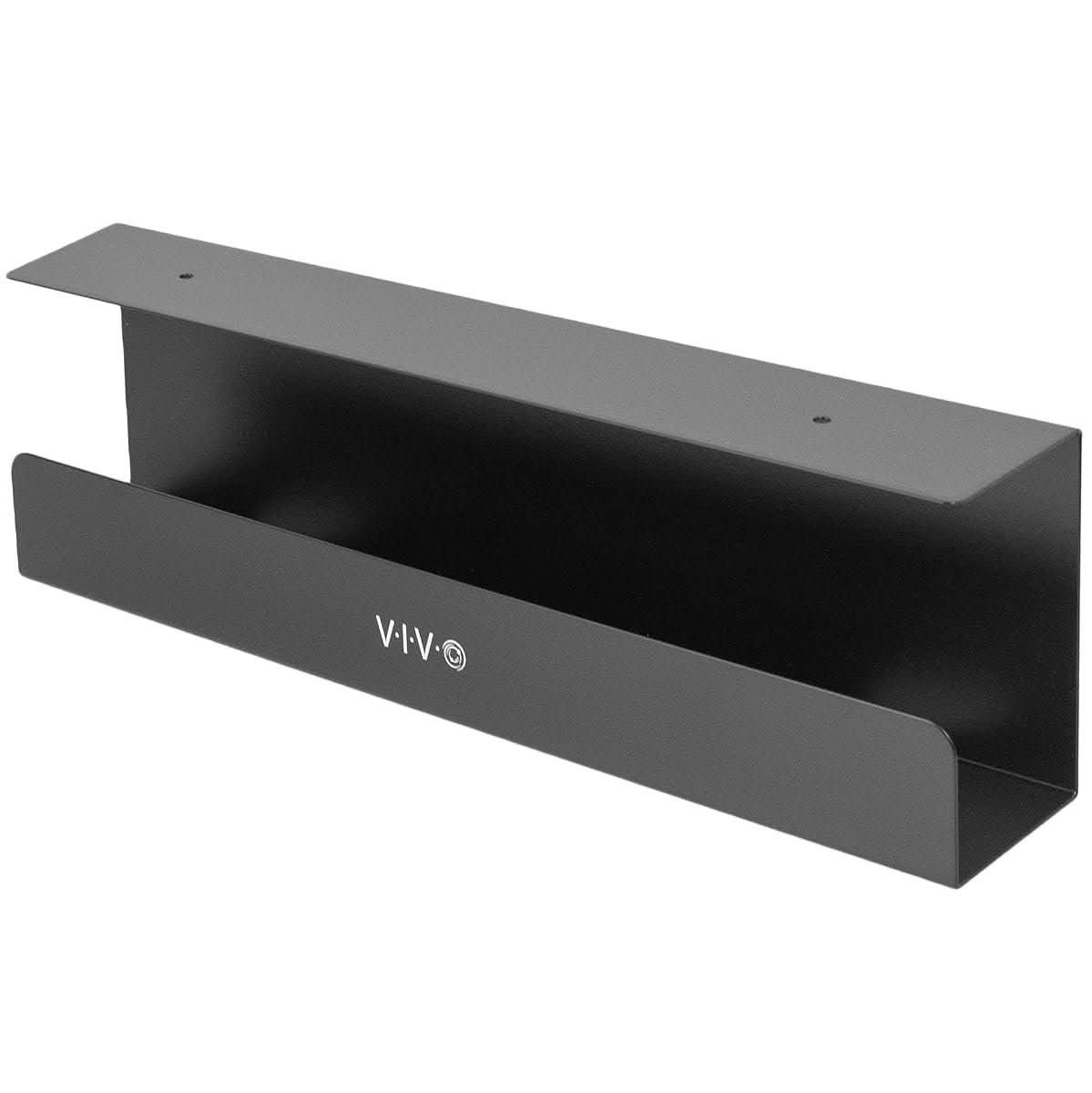
VIVO’s own bracket tray is a plain steel U-channel, 17 inches long, with the brand name pressed into the front face, not a sticker that can peel. It is the shortest screw-mount design on this list, which suits a compact desk or a corner unit better than the longer trays above it.
The open-top, open-front design means it is really a shelf more than a basket – good for keeping a power board off the floor, less good at hiding it from view, since there is no lid or mesh side wrapping around the cords. At 4.6 stars it has one of the stronger ratings among the compact designs, and the steel gauge feels a notch heavier in hand than the price suggests.
Two screw holes per bracket is the whole install, and it comes down just as fast if a desk changes hands later. The trade-off for the low price and compact size is capacity: a power board and two or three chargers is about the practical limit before things start overhanging the open front.
Pros
- Heavier steel gauge than the price point suggests
- Quick two-screw-per-bracket install and removal
- Compact 17-inch length suits a smaller desk or corner unit
Cons
- Open front and open top hide almost nothing from view, unlike the enclosed or mesh-sided designs
- A power board plus more than two or three chargers starts overhanging the edge
Key specs: 17in steel U-channel, 2-bracket screw mount, open front
CHECK ON AMAZON7. Adjustable-Length Slotted Cable Tray – Best Adjustable-Length Clamp
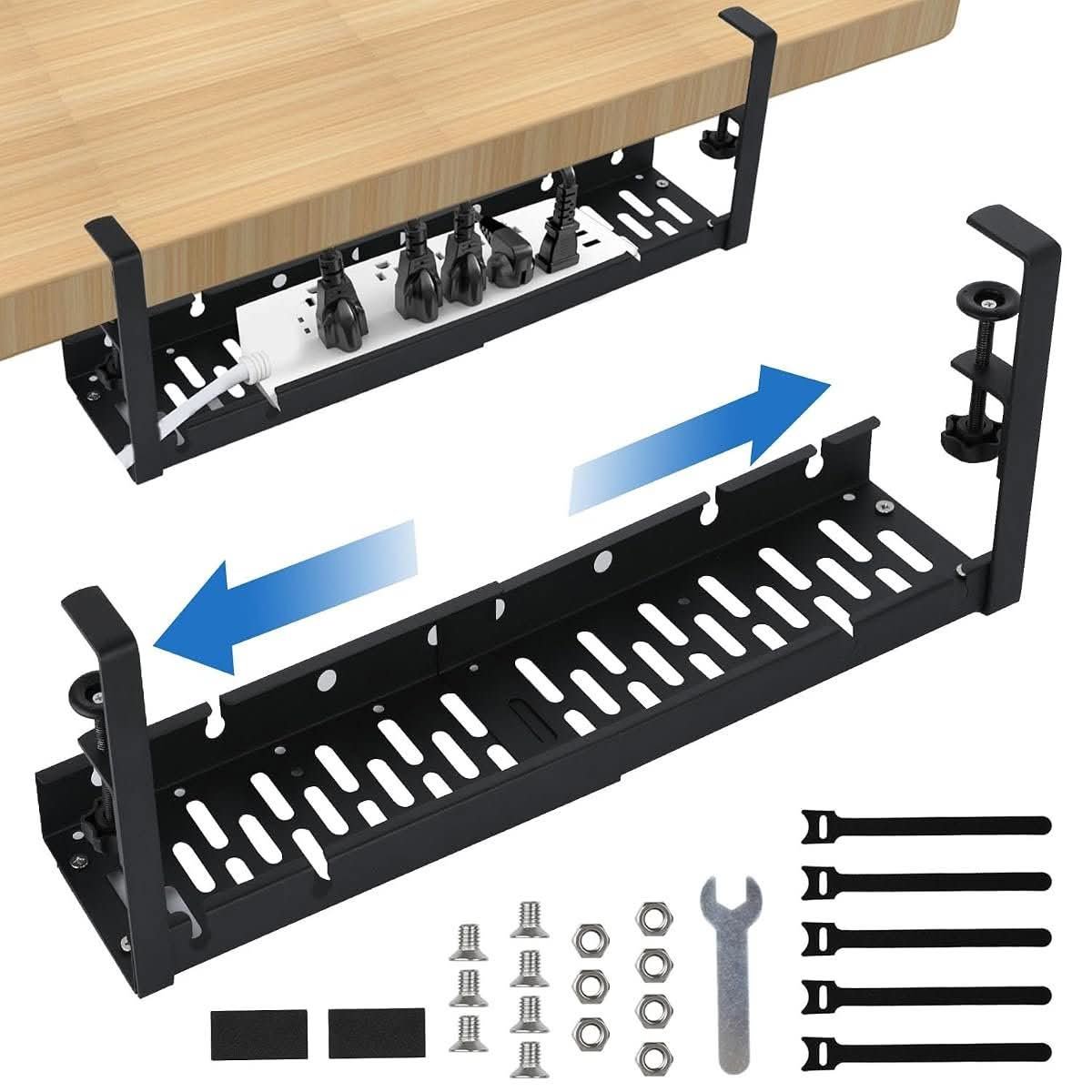
Unlike the telescoping basket at position five, this one adjusts by unbolting and resliding a slotted steel rail instead of sliding in place, using the wrench and bolts included in the box. It is a five-minute job with the tools provided, not a tool-free slide.
The slotted design also means it flexes to fit around a desk with an off-centre leg or drawer unit, where a fixed-length tray would need to be repositioned or simply fail to sit flush. At 4.1 stars off 14 ratings it is honestly one of the thinner review histories on this list.
Clamp-mounted, no drilling, and priced under thirty dollars, it is the cheapest way to get an adjustable-length tray on this list, at the cost of that longer bolt-and-reslide install instead of a simple telescoping slide.
Pros
- Adjusts to fit around an off-centre leg or drawer unit that would trip up a fixed-length tray
- Clamp mount, no drilling required
- Cheapest adjustable-length design on this list
Cons
- Adjusting the length means unbolting and resliding a rail, not a quick telescoping slide
- Only 14 ratings on the local listing, one of the thinner track records here
Key specs: Slotted steel rail, bolt-adjustable length, clamp mount, tools included
CHECK ON AMAZON8. Metal Mesh Cable Tray with Clamp – Best Value Mesh Basket
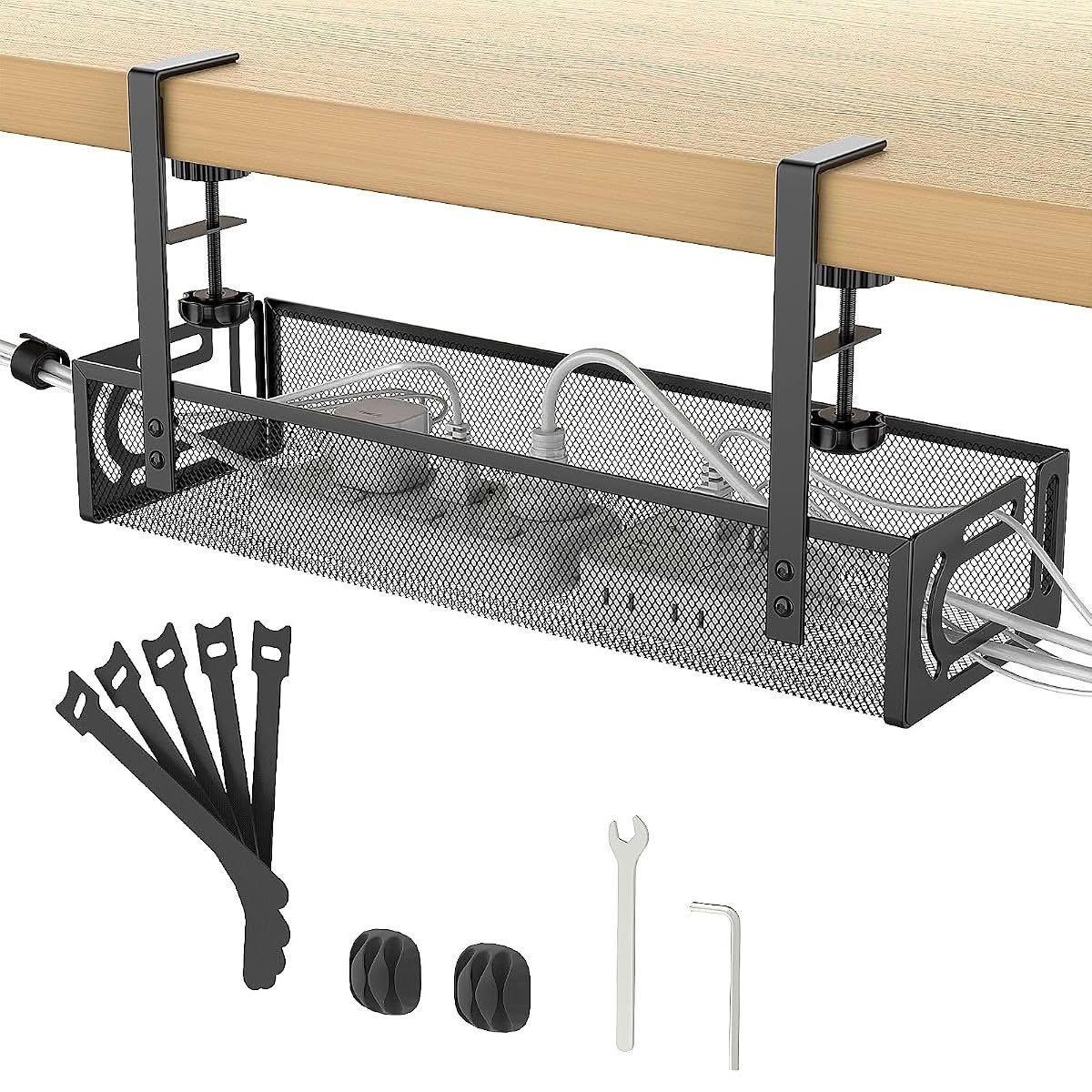
This is the mesh basket with the deepest track record on the entire list – 418 ratings at 4.5 stars, more than every other pick here combined. For a design this close to the clamp-on basket at position two, that kind of volume is the strongest real-user signal available in this category.
Mechanically it is the same idea as the position-two basket: two thumbscrew clamps, an open mesh body, cable ties included. The difference that shows up in the reviews is the clamp threading, described often enough as smoother to wind down than competing basket designs, which matters more than it sounds like after the fortieth adjustment while getting the fit right. Small detail. Real difference over a year of use.
It holds a single power board comfortably, the same practical limit as most of the mesh designs on this list, and sits toward the affordable end alongside the pick just below it.
Pros
- 418 ratings at 4.5 stars – the deepest review history of any pick in this guide
- Clamp thread reviewers describe as smoother than average to wind down
- Same practical power-board capacity as the other mesh baskets, at a lower price
Cons
- Mesh sides mean small items can still slip through if not bundled first
- No lid or enclosure, so it does not hide cords from view the way the D-Line box does
Key specs: Steel mesh, clamp mount, cable ties included, holds 1 power board
CHECK ON AMAZON9. Metal Mesh Cable Organiser with Clamp Mount – Best-Rated Clamp-On
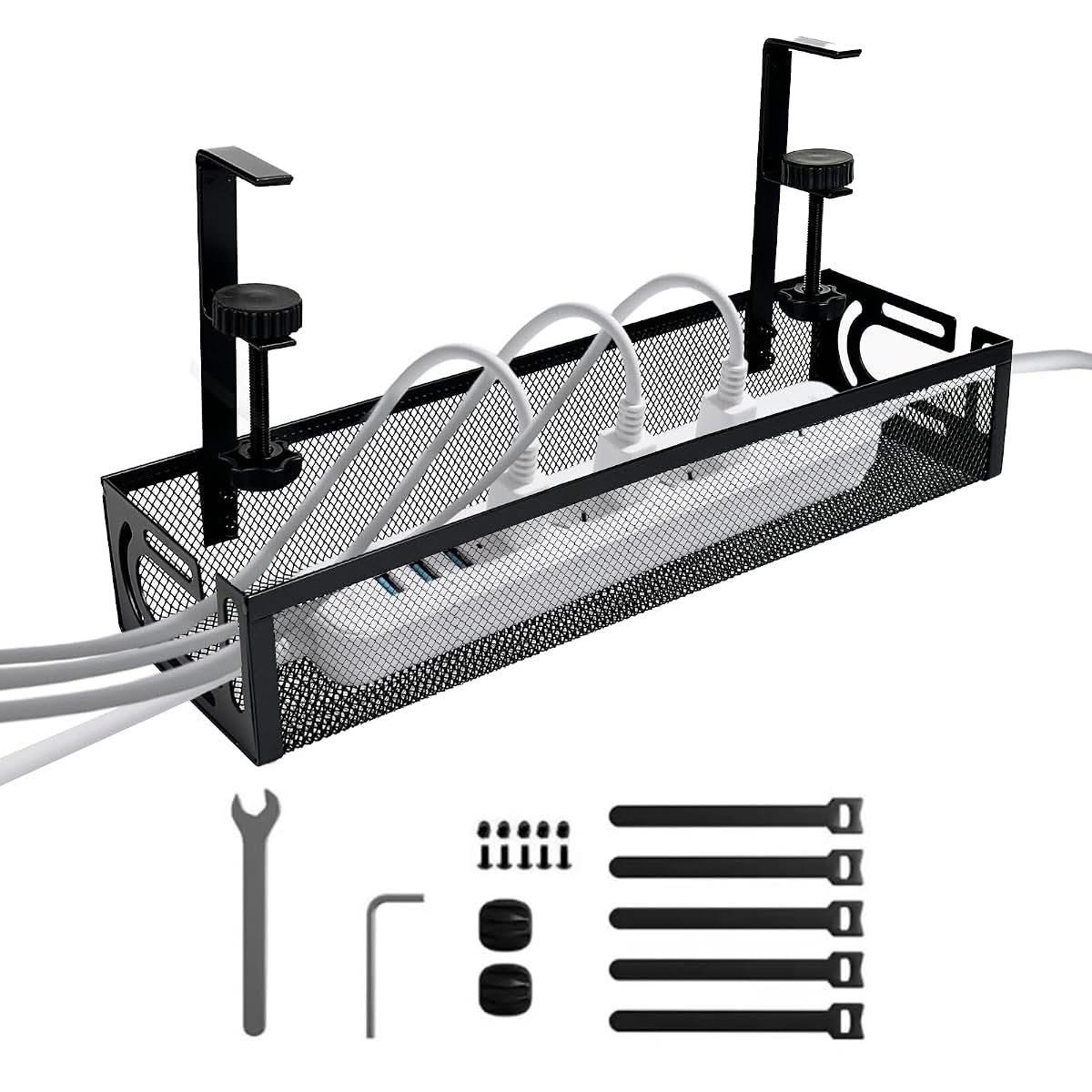
Half a star below the pick above it on review count, but a tenth of a point ahead on the rating itself – 4.8 stars off 42 reviews, the highest average of any mesh design on this list, even if the sample is smaller.
The two-hole clamp bracket is the detail that separates it from the otherwise near-identical baskets around it: two mounting points per clamp instead of one, which cuts down on the basket rocking side to side under the weight of a full power board and cords.
It is priced within two dollars of the mesh basket above it, so the real choice between them comes down to whether the smaller, higher-scoring review sample or the larger one carries more weight for you – both hold the same single power board comfortably.
Pros
- Highest average rating of any mesh basket on this list, at 4.8 stars
- Two-hole clamp bracket cuts down on side-to-side rocking versus a single-point clamp
- Priced within a couple of dollars of the next basket down
Cons
- Smaller review sample (42) than the mesh basket it sits closest to in price and design
- Same mesh-sides limitation – small items can slip through if not bundled
Key specs: Steel mesh, 2-hole clamp bracket, cable ties included
CHECK ON AMAZON10. Ultra-Rugged Desktop Cable Rack – Best Budget Pick
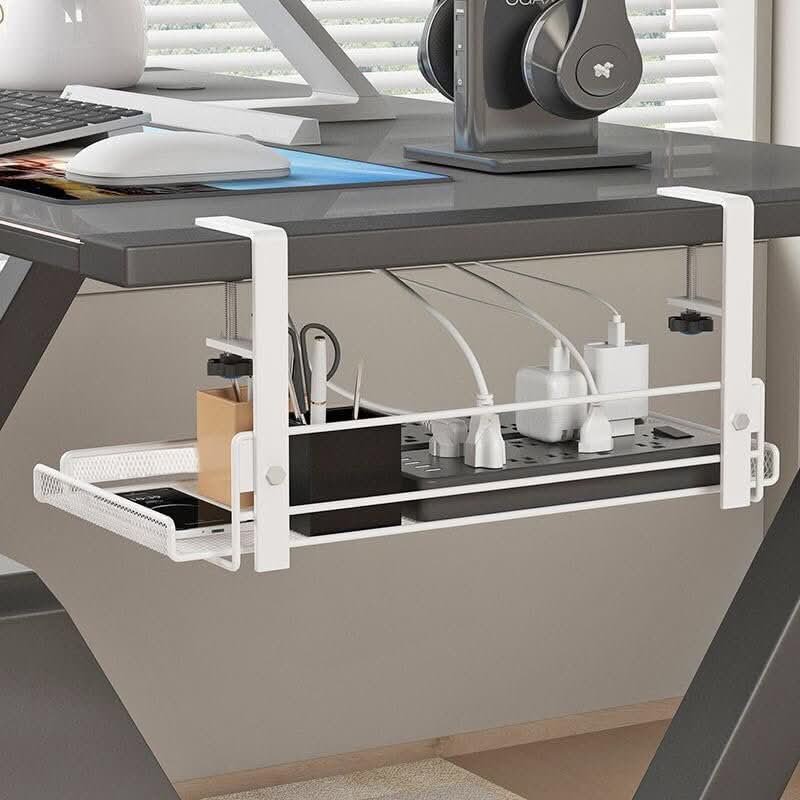
The cheapest pick on the entire list, and the only one that ships in white as standard, not as a second colour option. At 14.3 inches it is also one of the shorter trays here, sized for a single power board and not much beyond it.
It includes small plastic clips along the front lip for routing individual cables separately from the main bundle in the tray floor, a detail none of the steel mesh baskets bother with. At 4.1 stars off 64 ratings it sits mid-pack for a budget pick, neither the strongest nor the weakest track record here.
The trade-off for the price is finish: it is a lighter-gauge metal than the Brateck tray further up this list, and a couple of reviewers note the powder coat marking if a power board is dragged in and out often instead of left in place. For a set-and-forget install, that is not a real problem.
Pros
- Cheapest pick on this entire list
- Front-lip cable clips route individual cables separately from the main bundle
- Ships in white as standard, useful for a light-coloured desk
Cons
- Lighter-gauge metal than the steel picks further up this list
- Powder coat can mark if a power board is dragged in and out repeatedly instead of left in place
Key specs: 14.3in tray, clamp mount, front-lip cable clips, white finish
CHECK ON AMAZONHow to Choose a Cable Management Tray in Australia
Match the length to your desk, not the other way round. A 100cm tray under an 80cm desk sticks out both ends and looks like an afterthought; a 35cm clamp-on basket under a 160cm standing desk leaves half the cord run exposed. Measure the underside width first, and if you are still speccing the desk itself, our guide to the best standing desks in Australia is worth a look before the tray, since a fixed-height desk and a sit-stand one route cable slack differently as the desktop height changes.
Decide between a drill and a clamp early, not after it arrives. Renting, or not keen on putting four holes in the underside of a desk that isn’t really yours to modify? A clamp-on basket sidesteps that entirely. A screw-mount tray sits rock solid and can carry more weight, but it leaves four holes in the underside of the desk – a real problem in a rental with a strict end-of-lease clause, and a non-issue in a home you own outright. A clamp-on basket goes on and off in a couple of minutes with nothing to patch afterwards, at the cost of a lower weight limit and a thumbscrew that can work loose over months of knee bumps. Not a dealbreaker either way. Just weigh it up first.
An enclosed tray runs hotter than an open mesh basket, and that is not just a comfort issue. The ACCC has recalled power boards and double adaptors across more than a dozen separate actions covering upwards of 200,000 units, tracing back to faults such as misaligned socket contacts and plastic casings that fail flammability testing – the kind of fault that gets worse, not better, once heat has nowhere to go. That does not make every enclosed tray unsafe, but it is a real reason to avoid stacking two power boards inside one channel and to leave a gap instead of packing it solid.
Check what it is actually rated to hold before assuming it fits everything. A single power board with four to six chargers is what most trays and baskets on this list are sized for, and the tray itself only ever manages the clutter, not the electrical protection – Choice’s own buying guide to surge protectors and UPS units points out that a basic overload switch only guards against excess current draw, not a voltage spike, so a properly surge-rated board is a separate purchase from whatever holds it. A second power board, a USB charging hub the size of a paperback, or a run of HDMI and Ethernet leads on top of the power leads also pushes past what the compact clamp-on designs comfortably manage, even when the listing photo shows it looking roomy.
Think about where the slack goes, not just the tray itself. A tidy tray under the desk does nothing for the loop of cable still crossing the floor to the wall socket, and a laptop running hot on a stand next to an already crowded tray is a separate heat problem again – our guide to the best laptop cooling pads covers that half of the desk on its own. A cable tray solves the mess under the desktop; it will not fix a cord still running across the carpet.
Loose cable on the floor is a genuine trip hazard, not just an eyesore. Safe Work Australia’s own national data puts slips, trips and falls at 30,300 serious workers’ compensation claims a year, 21.8 percent of every serious claim nationally, and a home office with a cord crossing the walking path to the door carries the exact same physical risk as an untidy workplace. A tray or basket that actually clears the floor path, not just the desktop, is doing its real job.
You’ll Also Want
A tray only holds what is already bundled, so a pack of reusable hook-and-loop cable ties is worth grabbing at the same time to gather the loose ends before they go in.
For the run of cord still crossing the desktop to a monitor or lamp, a set of self-adhesive cable clips keeps it pinned to the underside of the desk instead of dangling in front of your knees.
A desktop cable organiser and protector set is the easiest fix for the short chargers and earbud cables that are too small to bother running through the main tray at all.
If the tray is going in to clear desk space for a second monitor, a monitor arm desk mount frees up the same real estate from above, which is the other half of a proper desk declutter.
Frequently Asked Questions
What is a cable management tray?
A cable management tray is a bracket-mounted channel, basket or box that clips, clamps or screws underneath a desk to hold a power board and the cords running to it, keeping them off the floor and out of sight. Some designs are solid and enclosed, others are open steel mesh, and the choice affects both how much heat builds up around the power board and how much weight the tray can carry. Measure your desk’s width and underside clearance before choosing one.
Do I need to drill holes to install a cable management tray?
It depends on the design. Screw-mount trays need four holes drilled into the underside of the desktop and hold more weight as a result, which suits a desk you own outright. Clamp-on baskets use a thumbscrew that grips the desk edge with no drilling, which suits a rental or shared office where the desk needs to go back to normal later. Check the desktop thickness range a clamp is rated for, since a thick benchtop can sit outside it.
How many cables can a cable management tray actually hold?
Most trays and clamp-on baskets sold in Australia are sized for one standard power board plus four to six phone and laptop chargers, which covers a typical single-monitor desk. A second power board, a bulky USB charging hub, or a run of HDMI and Ethernet leads on top of the power cords pushes past what a compact basket comfortably manages, even when the product photos make it look roomy. A full-length under-desk tray usually has more spare room.
Is it safe to put a power board inside an enclosed cable tray?
The ACCC has recalled power boards and double adaptors more than a dozen times over faults such as misaligned socket contacts and casings that fail flammability testing, and a fault like that only gets worse once heat has nowhere to go. An enclosed tray is not inherently unsafe, but avoid stacking two power boards inside one channel, do not overload the board with double adaptors, and pick an open mesh basket if the tray will run several high-draw chargers at once.
What is the difference between a cable tray and a cable raceway?
In Australian retail listings the two terms are mostly used interchangeably for the same under-desk product, though ‘raceway’ more often describes a fully enclosed plastic channel with a snap-on lid, while ‘tray’ can mean either an enclosed channel or an open basket design. Read the material and whether it is described as mesh, solid, or lidded instead of relying on the product name alone, since sellers are not consistent about the word they use.
Can a cable management tray fit any desk?
No. Clamp-on designs are rated for a specific desktop thickness range, typically somewhere between about 1 and 5cm, and a glass desktop or an unusually thick benchtop can sit outside that range entirely. Screw-mount trays need enough clear, flat underside space for four screws and are harder to fit around a desk with a central support leg or drawer unit in the way. Check both measurements against the product’s stated fitting range before buying.
Verdict
For most Australian home offices, the ErgoDesk tray at position one is the safest all-round pick if the desk is staying put and a drill isn’t a problem – it is the longest tray here and holds real weight without sagging. Renting, or just not keen on drilling into the desk? The mesh basket at position two does the same core job for a fraction of the price and comes off again in a couple of minutes flat. Anyone dealing with a power board that lives somewhere other than under a desk, a TV console or a printer stand, is better served by the D-Line box further down this list, which needs no mounting at all.