Most Australian external doors use a standard 60mm or 70mm deadbolt backset and a door thickness of roughly 35mm to 45mm, and that detail decides whether a given lock will even fit before anything else matters. Renters in particular need to check whether a unit retrofits onto the existing strike plate and deadbolt hole without drilling new holes or permanently altering the door, since a lease often depends on returning the original hardware at the end of a tenancy. Once that fit question is settled, the search for the best smart lock australia has to offer really comes down to a straightforward swap: a smart lock is an electronic door lock that replaces or retrofits a standard deadbolt, unlocked with an app, a numeric code, a fingerprint or a card instead of relying only on a physical key. That flexibility is the whole appeal, since a household can drop a physical key entirely or keep one as backup depending on how much trust they place in batteries and Wi-Fi.
Smart locks generally fall into a handful of recognisable categories. Keypad deadbolts replace the cylinder with a numeric pad and keep the same bolt-throw and strike plate as a standard lock, fingerprint locks add a biometric sensor as the primary or backup entry method, app-controlled locks rely on Bluetooth or Wi-Fi and a smartphone as the main key, and retrofit lever/knob locks rebuild the entire external handle assembly with electronics built into a knob or lever rather than a slim deadbolt cylinder.
Battery life on the current generation of smart locks typically runs from around four to twelve months on a set of standard batteries, depending on how often the lock is used and whether the keypad backlight stays active. When choosing a lock, the entry methods on offer, weather resistance for an external-facing unit, whether there is a mechanical key or backup terminal for a flat battery, and physical compatibility with the existing deadbolt or door hardware all matter more than any single standout feature.
This guide compares ten of the smart locks available to Australian shoppers, ranging from a simple keypad deadbolt through to fingerprint and knob-style units and locks built for deeper smart home integration. For anyone building out a smart home beyond the front door, our guide to the best robot vacuum in Australia is a natural next stop.
Quick Picks
EZVIZ DL04 Pro Smart Lock
Fingerprint, keypad, app and key entry built for the EZVIZ smart home ecosystem.
CHECK CURRENT PRICE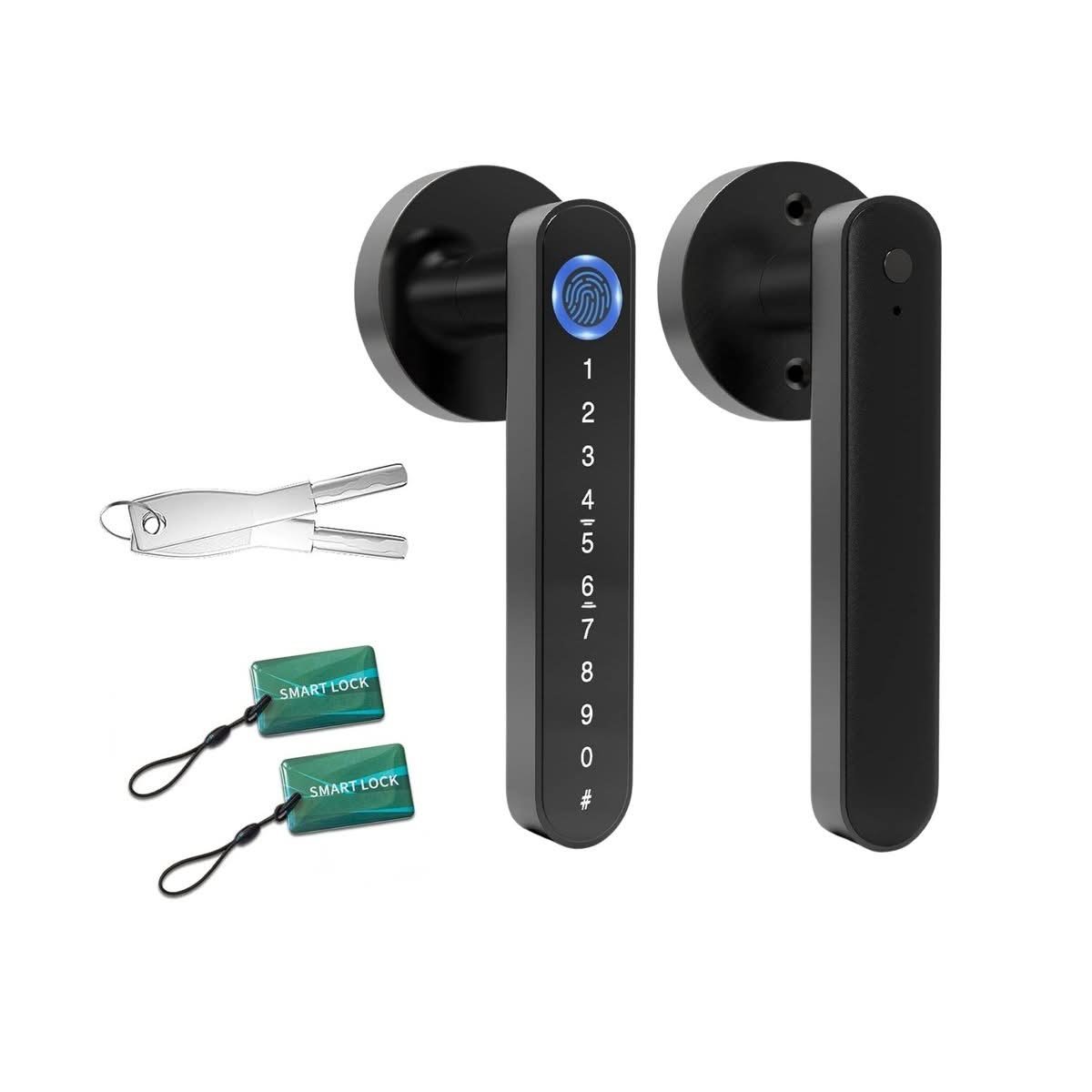
Tooleroo Digital Smart Door Lock Handle
Five entry methods on a full lever-handle body.
CHECK CURRENT PRICE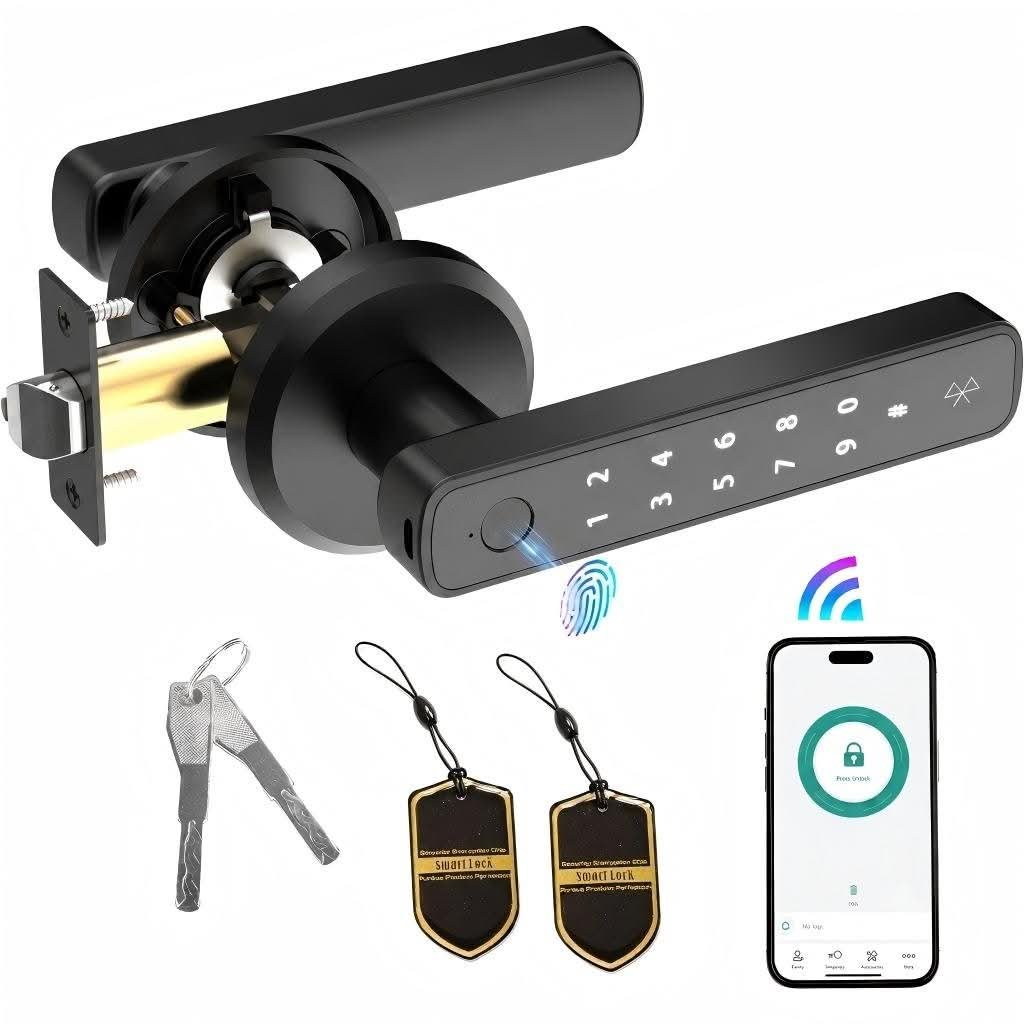
Advwin Fingerprint Door Lock with App
A straightforward deadbolt retrofit with fingerprint, app and keypad backup.
CHECK CURRENT PRICEBest Smart Lock Australia Compared
| Product | Link | Type | Best For | Key Spec |
|---|---|---|---|---|
| EZVIZ DL04 Pro Smart Lock | Check price | Ecosystem lock | Best for Smart Home Integration | 4 entry methods, EZVIZ integration |
| Tooleroo Digital Smart Door Lock Handle | Check price | Lever handle | Best 5-in-1 Access | 5 entry methods, lever body |
| Advwin Fingerprint Door Lock with App | Check price | Deadbolt | Best Traditional Deadbolt Style | Fingerprint, app, keypad backup |
| Advwin Fingerprint Door Knob Smart Door Lock | Check price | Knob lock | Best Knob-Style Design | Fingerprint, keypad, no app |
| Advwin Fingerprint Smart Door Knob Lock with Bluetooth | Check price | Knob lock | Best Bluetooth Connectivity | Fingerprint, Bluetooth app |
| Keyless Entry Keypad Deadbolt | Check price | Keypad deadbolt | Best Simple Keypad Entry | 100 codes, anti-peep, low battery alarm |
| Aqara Smart Lock U100 | Check price | Ecosystem lock | Best for Apple Home Users | Apple Home Key, IP65 |
| TP-Link Tapo DL100 | Check price | App-controlled | Best Recognisable Brand | BHMA-rated, fingerprint, app |
| ULTRALOQ Bolt SE | Check price | Matter-compatible | Best Matter Compatibility | Matter, Wi-Fi, 7 entry modes |
| ACDOKE Smart Lock Fingerprint Door Knob Set | Check price | Knob lock | Best Value Pick | Fingerprint, keypad, basic app |
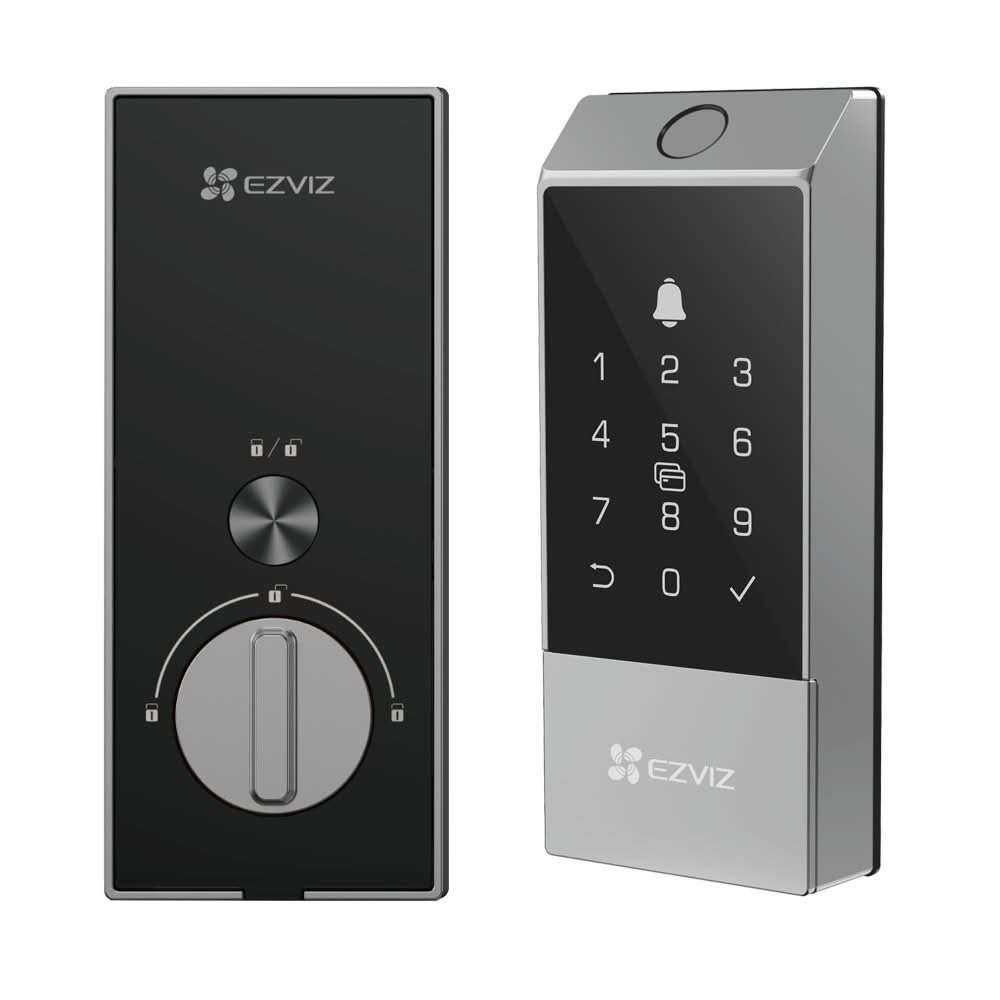
1. EZVIZ DL04 Pro Smart Lock – Best for Smart Home Integration
The EZVIZ DL04 Pro Smart Lock combines a fingerprint sensor, a backlit keypad, an app and a physical key into one deadbolt-style body, so there are four distinct ways to get through the door. Its housing sits within the EZVIZ ecosystem, built to be one node in a wider camera and sensor setup rather than a standalone gadget. The finish is understated, with buttons that stay flush against the faceplate when not in use.
In daily use, the fingerprint sensor is the fastest way in, while the keypad and app sit in reserve for guests or when hands are full. Auto-lock engages a short delay after the door closes, so the household is not left checking whether the deadbolt actually threw. Anyone already running EZVIZ cameras or sensors will notice the lock reporting into the same app rather than sitting in its own silo.
The catch is that the lock’s real value only shows up once it is one part of a larger EZVIZ setup, so a household with no other EZVIZ hardware is really just buying a well-built fingerprint deadbolt. Homes already invested in that ecosystem get the most out of the auto-lock and app reporting working together. For a first smart lock with no existing camera or sensor gear, the ecosystem tie-in is a feature that stays dormant.
Pros
- Four entry methods covering fingerprint, keypad, app and key
- Auto-lock removes the need to check the door manually
- Reports into the same app as other EZVIZ devices
Cons
- Ecosystem features add little value without other EZVIZ gear
- No Matter or Apple Home support
Key specs: fingerprint, keypad, app and physical key entry, EZVIZ ecosystem integration, auto-lock
CHECK CURRENT PRICE2. Tooleroo Digital Smart Door Lock Handle – Best 5-in-1 Access
Built around a lever-handle body rather than a deadbolt cylinder, the Tooleroo Digital Smart Door Lock Handle packs five separate entry methods into one unit: keypad code, card, fingerprint, app and physical key. That is one more option than the EZVIZ DL04 Pro Smart Lock above it, aimed at households where different family members prefer different ways in. The lever shape suits doors already fitted with handle-style hardware rather than a slim deadbolt.
Five entry methods means five potential points of failure, but also five fallbacks if one stops working, whether that is a flat battery, a lost card or a fingerprint that will not read in the cold. The card option in particular suits share houses or short-stay arrangements where handing over a physical key is not practical. Response speed on the lever mechanism is on par with the fingerprint-first locks in this guide.
Because it replaces the whole handle rather than just the cylinder, fitting the Tooleroo lock is a bigger job than swapping a deadbolt insert, which makes it a poorer fit for a rental needing to preserve original hardware. Households renovating a front entry or replacing an ageing handle set outright get more value from the extra entry options. Anyone renting should compare it against the deadbolt-style entries later in this guide before committing to a full handle replacement.
Pros
- Five entry methods, more than any other lock here
- Card entry suits share houses and short-stay guests
- Lever body fits doors already set up for handle hardware
Cons
- Full handle replacement is a bigger installation job
- Less rental-friendly than a deadbolt-style retrofit
Key specs: keypad code, card, fingerprint, app and physical key entry, lever-handle style
CHECK CURRENT PRICE3. Advwin Fingerprint Door Lock with App – Best Traditional Deadbolt Style
The Advwin Fingerprint Door Lock with App keeps the traditional deadbolt form factor, dropping into the same backset and strike plate as the mechanical lock it replaces. Fingerprint and app unlock cover daily use, with a keypad kept in reserve as backup. Unlike the lever-handle Tooleroo above, this is a straightforward cylinder swap rather than a full handle replacement.
Fingerprint recognition is the default method day to day, unlocking quickly for a registered print, while the app handles remote checks and lets a visitor be granted access without a spare key. The keypad backup covers a wet, gloved or unregistered fingertip, so there is no single point of failure. That backup layer is worth comparing against the Tooleroo’s card slot above, since both exist to cover the same fingerprint failure case in different ways.
Because it keeps the standard deadbolt shape, it is a closer like-for-like retrofit than the lever-handle Tooleroo above, without altering the door frame. Anyone wanting a straightforward upgrade from a mechanical deadbolt, rather than a full handle or knob replacement, gets that here without extra fuss. Renters checking backset compatibility will find this an easier sell to a landlord than a handle swap.
Pros
- Retrofits the standard deadbolt backset and strike plate
- Fingerprint plus app plus keypad covers most failure cases
- Easier to revert than a full handle replacement
Cons
- No card or Bluetooth entry option
- App features depend on ongoing account setup
Key specs: deadbolt form factor, fingerprint and app unlock, keypad backup
CHECK CURRENT PRICE4. Advwin Fingerprint Door Knob Smart Door Lock – Best Knob-Style Design
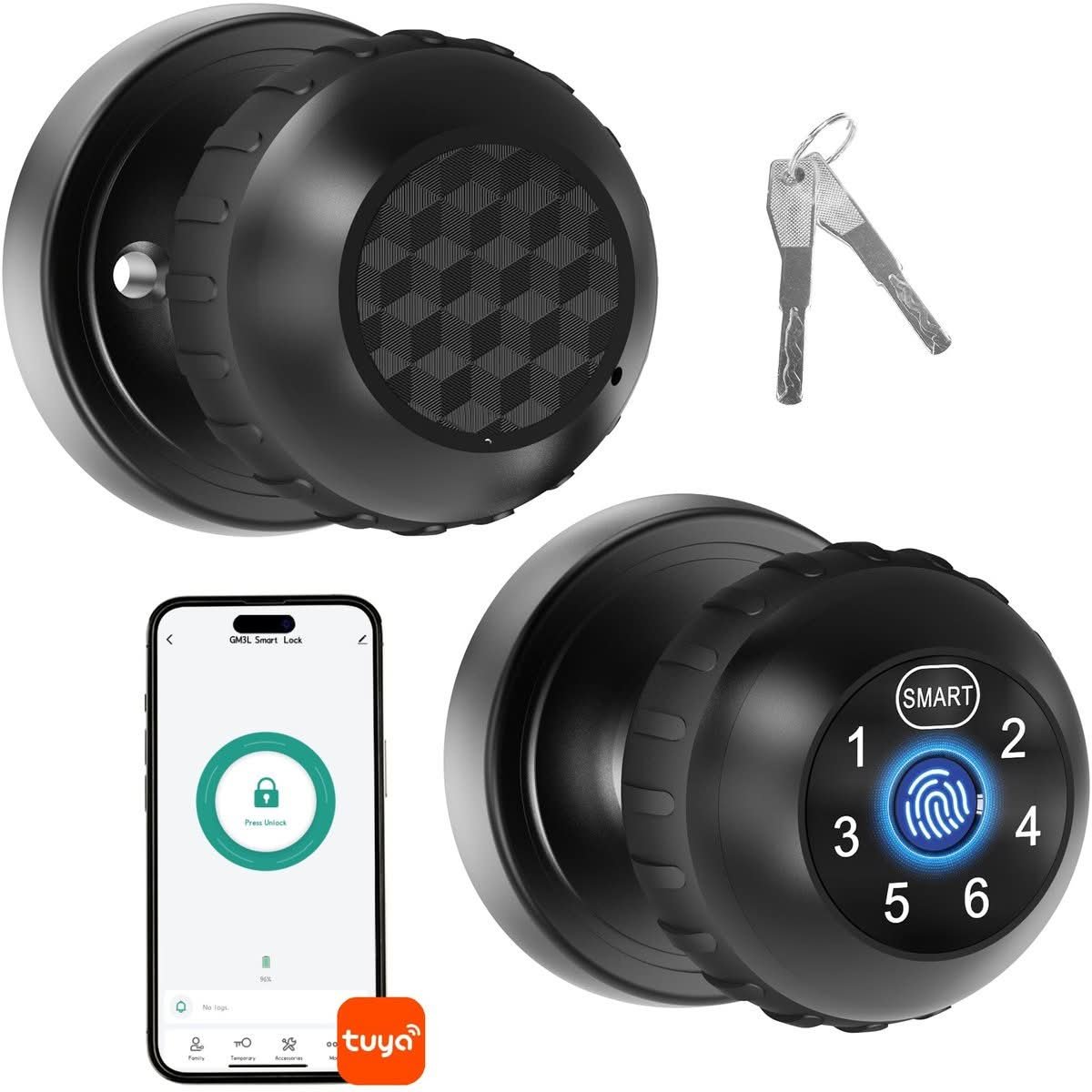
Where the Advwin Fingerprint Door Lock with App above sticks to a deadbolt cylinder, the Advwin Fingerprint Door Knob Smart Door Lock moves to a full knob-style body with fingerprint and keypad entry. It drops the app and card options its sibling and the Tooleroo carry, keeping the entry list simple. The knob shape suits doors already fitted with round-knob hardware rather than a slim deadbolt insert.
Fingerprint entry is quick for the household’s registered users, and the keypad covers anyone without a saved print, the same fallback pairing used on the deadbolt version above. Without app control, there is no remote unlock or activity log to check from a phone, which keeps setup simpler but removes a feature some households rely on. Turning the knob itself feels no different from a standard mechanical knob once it is unlocked.
The trade-off is flexibility: dropping app support means no remote access for a visitor or a delivery, which the fingerprint deadbolt above and several other entries in this guide do offer. It suits a household that wants fingerprint convenience on a knob-style door without needing to manage the lock from a phone. Anyone who already wants app control should look at the Bluetooth version below instead.
Pros
- Simple two-method entry with no app account required
- Knob body suits doors already fitted for round-knob hardware
- Fingerprint and keypad fallback mirrors the deadbolt version above
Cons
- No app control or remote access
- No card or Bluetooth entry option
Key specs: knob/lever form factor, fingerprint and keypad entry
CHECK CURRENT PRICE5. Advwin Fingerprint Smart Door Knob Lock with Bluetooth – Best Bluetooth Connectivity

Adding Bluetooth to the same knob-style body as the entry above, the Advwin Fingerprint Smart Door Knob Lock with Bluetooth brings back the app control that its knob-only sibling leaves out. Fingerprint entry remains the primary method, with Bluetooth handling the phone connection rather than a full Wi-Fi link. The knob form factor and general fit are otherwise the same as the Advwin Fingerprint Door Knob Smart Door Lock above.
Bluetooth keeps the app connection local rather than routing through the internet, which means faster response when the phone is within range but no remote unlock from outside Bluetooth distance. That is a narrower feature set than the Wi-Fi and Matter-connected locks later in this guide, but it also means less reliance on a home network staying up. Fingerprint performance mirrors the other two Advwin locks in this list.
Anyone wanting to check the door status from work or grant access to someone off-site will find the Bluetooth range a real limitation, since that needs a Wi-Fi or Matter connection instead. A household happy to unlock by fingerprint most of the time, using the phone only as a near-range backup, is the right fit here. Compare it against the Aqara or ULTRALOQ picks further down if remote access matters more than local Bluetooth convenience.
Pros
- Restores app control missing from the knob-only Advwin above
- Bluetooth connection works without relying on home Wi-Fi
- Fingerprint entry consistent with the other Advwin locks
Cons
- No remote access once the phone is out of Bluetooth range
- No Wi-Fi or Matter connectivity for off-site checks
Key specs: knob form factor, fingerprint entry, Bluetooth app control
CHECK CURRENT PRICE6. Keyless Entry Keypad Deadbolt – Best Simple Keypad Entry
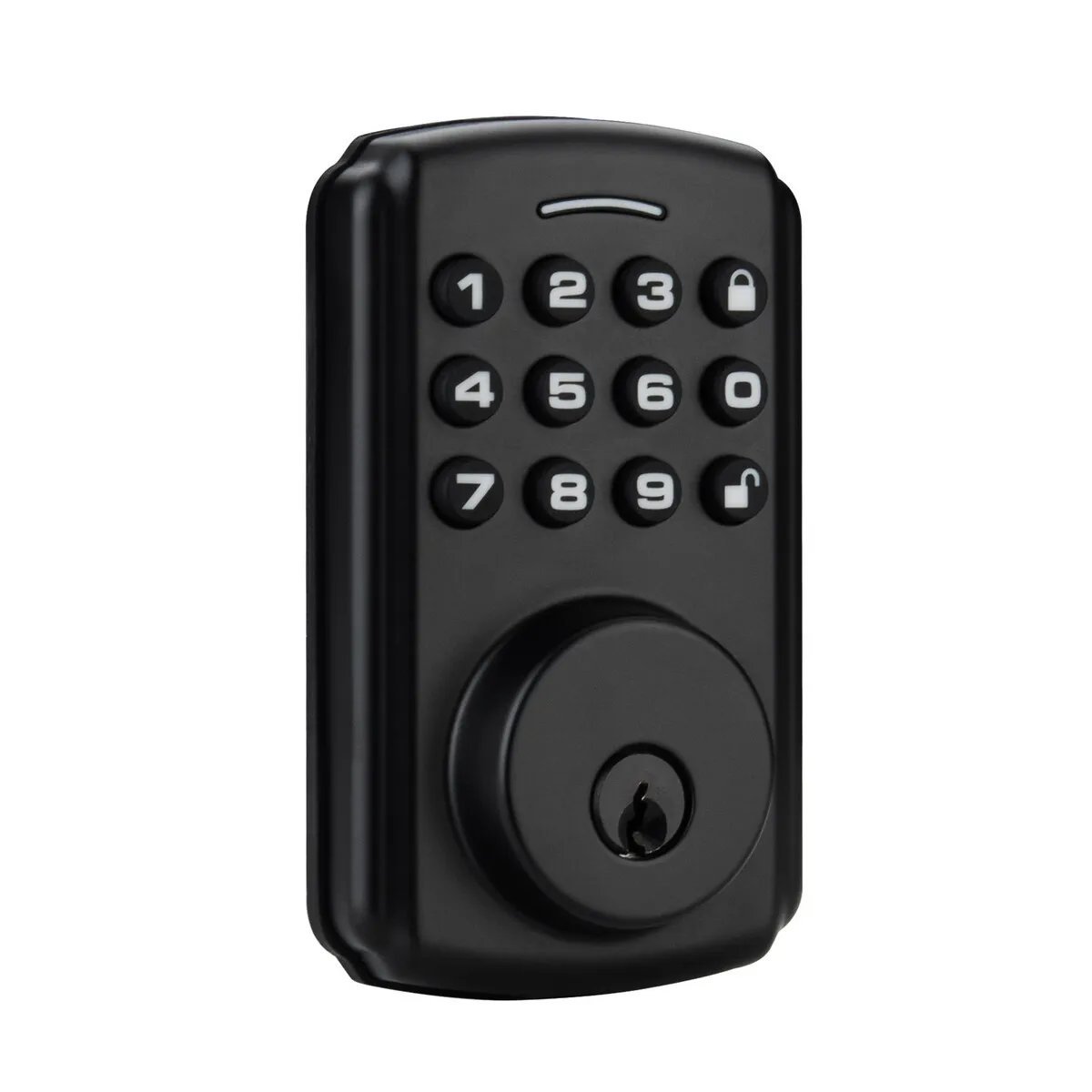
Stripped back to keypad-only entry, the Keyless Entry Keypad Deadbolt supports up to 100 individual codes within a standard deadbolt body, with no fingerprint sensor or app layer to configure. Anti-peep code scrambling lets a code work even with extra random digits added before or after it, so a shoulder-surfer watching the keypad cannot simply copy the sequence. A low battery alarm gives warning before the lock is left without power.
With 100 codes available, a family can hand out a unique combination to each cleaner, tradesperson or visiting relative and revoke a single one without resetting the whole lock. The anti-peep scrambling adds a small delay to entry compared with a straight fingerprint tap, but it is a reasonable trade for a lock that never needs a phone nearby. The low battery alarm sounds well before the codes stop working, unlike some of the app-connected locks in this guide that rely on a push notification instead.
Skipping fingerprint and app support keeps things simple, but it also means no remote access and no biometric shortcut for anyone who finds punching in a code tedious. This is the pick for a household that wants dependable keypad entry without managing an app account or pairing a phone. Landlords managing several rental codes across tenants get more mileage out of the 100-code capacity than most single-household buyers will ever need.
Pros
- 100-code capacity suits multiple users or tenants
- Anti-peep scrambling blocks shoulder-surfing
- No app or phone pairing required to operate
Cons
- No fingerprint or remote access options
- Code entry is slower than a fingerprint tap
Key specs: 100-code keypad entry, anti-peep code scrambling, low battery alarm, deadbolt style
CHECK CURRENT PRICE7. Aqara Smart Lock U100 – Best for Apple Home Users

Apple Home Key support is the headline feature of the Aqara Smart Lock U100, letting an iPhone unlock the door via NFC without opening an app first. It carries an IP65 rating, giving it a genuine weather-resistance figure for exterior mounting rather than a vague marketing claim. Fingerprint and app entry round out the options for anyone without an Apple device on hand.
For an Apple Home household, tapping a phone against the lock is faster than the fingerprint-first flow on most of the other entries here, since it does not need a registered print at all. The IP65 rating means dust and low-pressure water jets are accounted for, relevant for anyone with a front door exposed to weather rather than tucked under a porch. Fingerprint entry stays available as a fallback for guests without an Apple device set up.
The Home Key feature only pays off inside an Apple-based smart home, so an Android household is really just buying a fingerprint and app lock with a weatherproof rating attached. It is the strongest pick in this guide for a household already running other Apple Home accessories. Anyone on Android or wanting broader ecosystem support should look at the Matter-compatible ULTRALOQ entry further down instead.
Pros
- Apple Home Key allows tap-to-unlock without opening an app
- IP65 rating suits an exposed exterior door
- Fingerprint and app entry cover non-Apple guests
Cons
- Home Key advantage is wasted outside an Apple Home setup
- No Matter support for other platforms
Key specs: Apple Home Key support, IP65 weather resistance, fingerprint and app entry
CHECK ON AMAZON8. TP-Link Tapo DL100 – Best Recognisable Brand

Carrying a BHMA rating, the TP-Link Tapo DL100 ties its hardware to an established testing standard rather than an unverified badge on the box. App control, fingerprint and keypad entry cover the same three basic methods found across most of this list. The lock sits under a brand already known in Australia for its Tapo smart home cameras and plugs.
Fingerprint entry is the quickest day-to-day method, with the keypad as backup and the app for remote checks or granting temporary access. Because it comes from a brand already selling routers, cameras and smart plugs in Australia, setup and troubleshooting support is easier to find than for some of the newer names in this guide. The BHMA rating also gives a concrete reference point for build quality that not every competitor publishes.
There is nothing here that leapfrogs the Aqara or ULTRALOQ locks on ecosystem features, so the appeal is really about buying from a name already trusted for other smart home gear rather than a spec advantage. Households already running other Tapo devices get the most value from familiar setup and a single app to manage. For anyone who values brand recognition over the widest possible feature set, this is the safer bet.
Pros
- BHMA rating gives a verifiable build-quality benchmark
- Familiar brand already used for cameras and plugs in Australia
- Fingerprint, keypad and app cover the core entry methods
Cons
- No Matter or Apple Home Key support
- No feature advantage over the Aqara or ULTRALOQ picks
Key specs: BHMA-rated, app control, fingerprint and keypad entry
CHECK ON AMAZON9. ULTRALOQ Bolt SE – Best Matter Compatibility

Matter and Wi-Fi support set the ULTRALOQ Bolt SE apart from the more closed ecosystems earlier in this guide, since Matter lets it work with Apple Home, Alexa and Google Home rather than locking a household into one brand’s app. Seven separate entry modes are packed into the one unit, more than any other lock in this list. The result is the most flexible ecosystem story here, at the cost of a more involved initial setup.
Because Matter is a shared standard, the Bolt SE can sit inside a mixed household running Apple Home on one phone and Google Home on another without either person losing functionality. Seven entry modes mean there is likely a method to suit almost anyone, from fingerprint through to app and keypad. Wi-Fi connectivity also allows remote checks from anywhere, unlike the Bluetooth-only Advwin lock earlier in this guide.
That flexibility comes with more configuration than a simple keypad deadbolt, so a household that just wants to punch in a code and go may find the setup process longer than it needs to be. Anyone already juggling different smart home platforms across family members benefits most from the Matter compatibility here. For a household not tied to Apple, Alexa or Google Home already, that advantage is largely wasted.
Pros
- Matter support works across Apple Home, Alexa and Google Home
- Seven entry modes, the most of any lock in this guide
- Wi-Fi allows remote checks from outside the home
Cons
- More setup steps than a simple keypad deadbolt
- Matter advantage adds little for a single-platform household
Key specs: Matter and Wi-Fi support, works with Apple Home, Alexa and Google Home, 7 entry modes
CHECK ON AMAZON10. ACDOKE Smart Lock Fingerprint Door Knob Set – Best Value Pick
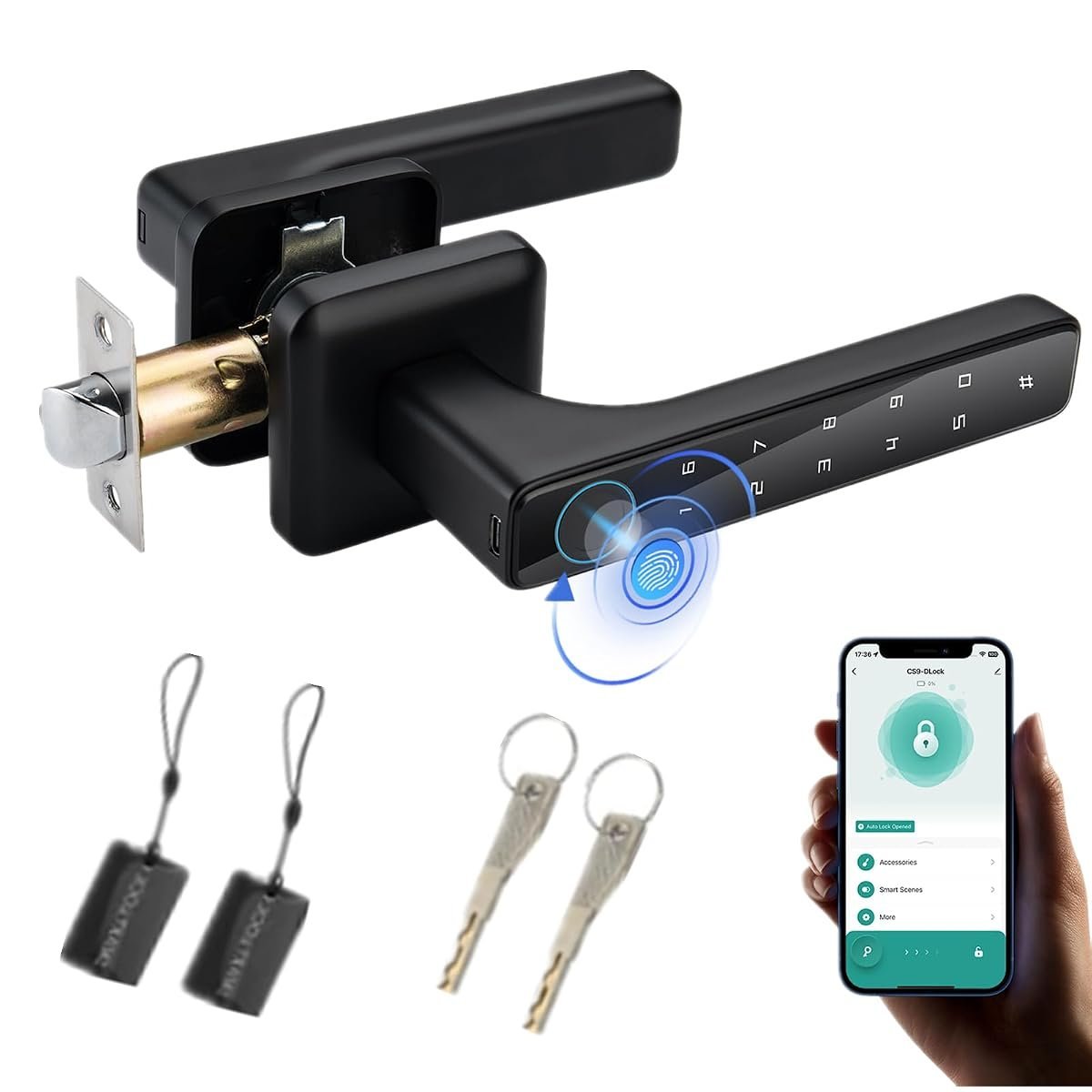
Rounding out the list, the ACDOKE Smart Lock Fingerprint Door Knob Set covers fingerprint, keypad and basic app control in a knob-style body. It shares the same core entry methods as the Advwin knob locks earlier in this guide, without the Bluetooth layer the third Advwin pick adds. The knob form factor again suits doors already fitted for round-knob hardware.
Fingerprint and keypad entry both work as expected day to day, and the app covers basic remote checks rather than the fuller feature set on the ULTRALOQ or Aqara picks above. It is a simpler package than either of those two, trading some ecosystem depth for a more accessible position in this guide. Anyone comparing it against the knob-style Advwin locks will find the entry methods largely overlap.
The basic app is the clearest compromise, handling status checks without the remote automation or ecosystem integration that the Matter-compatible or Apple Home-focused locks in this guide offer. This is the pick for a household prioritising fingerprint and keypad reliability over smart home depth. Anyone who never plans to link the lock to Alexa, Google Home or Apple Home loses nothing by choosing it over the pricier ecosystem-focused entries.
Pros
- Fingerprint, keypad and basic app cover everyday use
- Knob body suits doors already set up for round-knob hardware
- Straightforward option for households skipping smart home integration
Cons
- App is basic compared with the Matter or Apple Home-focused picks
- No Bluetooth or Matter connectivity
Key specs: fingerprint and keypad entry, knob form factor, basic app control
CHECK ON AMAZONHow to Choose Best Smart Lock
Entry methods vary from a single keypad through to combinations of fingerprint, app, card and physical key, and the right mix depends on how many people use the door and how comfortable they are with a phone-based system. A share house or family with kids benefits from multiple fallback methods, while a single occupant might prefer the simplicity of just a keypad or fingerprint. Consider whether a lost phone or flat battery would leave anyone genuinely locked out.
Door and deadbolt compatibility comes down to backset measurement and door thickness, since a lock built for a 60mm backset will not sit correctly in a door drilled for 70mm without an adapter. Most Australian external doors fall within a 35mm to 45mm thickness range, but older or solid timber doors can sit outside that band. Measuring the existing hardware before ordering avoids a return or an awkward retrofit.
Weather resistance matters for any lock mounted on an exterior door exposed to rain, sun or coastal air, and an IP rating gives a concrete way to compare units rather than relying on a general weatherproof claim. A lock under a covered porch has less exposure than one on an open exterior wall, which can influence how much weatherproofing is actually needed. Locks without a published IP rating should be treated as indoor-facing unless stated otherwise.
Battery life and backup power should be checked before relying on any electronic lock as a sole entry method, since most units run on standard batteries lasting several months rather than a year or more. A low battery alarm or notification gives warning before the lock stops responding, and a mechanical key override or external terminal for a portable charger avoids being locked out entirely. Replacing batteries on a fixed schedule is safer than waiting for a warning.
Smart home ecosystem compatibility is worth checking against whatever a household already runs, whether that is Apple Home, Matter, Alexa or Google Home, since a lock tied to the wrong platform will not integrate with existing routines or voice control. Matter-compatible locks offer the broadest cross-platform support, useful for a household split across different phone brands. A lock with no smart home protocol at all still works fine as a standalone unit, just without automation.
Installation difficulty and rental-friendliness separate a simple cylinder swap from a full handle or knob replacement, and the difference matters most for anyone who does not own the property. A deadbolt-style retrofit that reuses the existing strike plate and holes is generally the easiest to reverse at the end of a lease. Anyone renting should confirm with a property manager before drilling new holes or removing original hardware permanently.
Home safety goes beyond the front door, and our smoke alarm guide explains which sensor and battery types meet current Australian requirements.
To round out a smart home, a home weather station reports conditions in your own backyard rather than the suburb as a whole.
Frequently Asked Questions
Do smart locks work during a power outage?
Yes, since virtually all of the locks in this guide run on their own batteries rather than mains power, so a home power outage does not affect them directly. A flat battery is the more realistic risk, which is why a mechanical key backup or external charging terminal matters when comparing models.
Can a smart lock be fitted to a rental property without voiding the lease?
It depends on whether the unit retrofits the existing deadbolt or requires drilling new holes or replacing the whole handle. Keypad deadbolts and fingerprint deadbolts that reuse the current backset and strike plate are the easiest to remove and revert, and any change should still be cleared with the property manager first.
How long do the batteries in a smart lock typically last?
Battery life generally runs from around four to twelve months, depending on how often the lock is used and whether features like a keypad backlight or fingerprint sensor stay active. Locks with a low battery alarm give warning well before the batteries are fully spent.
What happens if the fingerprint sensor or keypad fails to recognise a valid entry?
Most fingerprint locks in this guide include a keypad or app as a fallback, so a failed fingerprint read is not a lockout on its own. It is worth checking that any lock under consideration has at least one backup method beyond its primary sensor.
Do these locks need Wi-Fi to work?
No, Wi-Fi is only required for remote access and notifications on locks that support it, such as the ULTRALOQ Bolt SE or TP-Link Tapo DL100. Keypad and fingerprint entry still work locally without an internet connection, since the lock only needs the network for the app-based features.
Are smart locks weatherproof enough for an exposed Australian front door?
Only if they carry a specific IP rating, such as the IP65 rating on the Aqara Smart Lock U100, which covers dust ingress and low-pressure water jets. Locks without a stated rating should be assumed to need some shelter, such as a porch or awning, rather than direct weather exposure.
Verdict
Across this list, the Aqara Smart Lock U100 stands out for households already inside the Apple ecosystem thanks to its Home Key support and IP65 rating, while the ULTRALOQ Bolt SE is the stronger pick for anyone who wants Matter compatibility across Apple Home, Alexa and Google Home rather than being tied to one platform. For a simpler, no-frills option, the Keyless Entry Keypad Deadbolt covers the basics with its 100-code capacity and anti-peep scrambling without any app or fingerprint layer to manage. Anyone unsure where to start should measure their door’s existing backset and thickness before choosing between these three.